
 EN
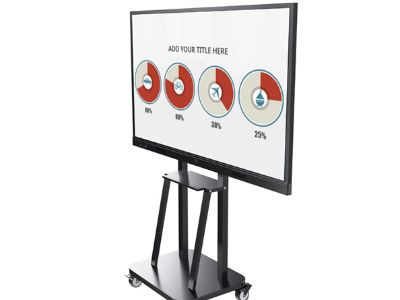
Commercial interactive whiteboards are modern equipment that allow a more interactive way of teaching and presentation. These commercial interactive whiteboards systems often rely on multi-device syncing so that devices such as laptops, tablets, and phones can share content easily, and buyers should understand the relevant quality control measures. Through multi-device syncing, different gadgets such as laptops, tablets, and smartphones can connect to an interactive whiteboard, making interaction and sharing information easier. In this article, we will discuss the main considerations for B2B buyers interested in commercial interactive whiteboards, including what needs to be checked to ensure smooth operation and quality.
How to Choose the Right Commercial Interactive Whiteboards for Your Needs?
In choosing the proper commercial interactive whiteboard, it is important to consider the specific needs of your business. Knowing the key specifications of such commercial interactive whiteboards helps you compare options and choose the most suitable fit for your business. First, identify the purpose of using the whiteboard. If it is for education, a higher level of interactivity and functionality may be needed. For corporate presentations, compatibility with different devices is key. An important aspect is the active whiteboard size and resolution of the whiteboard. These factors, such as size and resolution, connectivity options like Wi-Fi, Bluetooth, or wired links, and the after-sales warranty, all impact daily use. Larger sizes are better for more people, while higher resolution gives a clearer image. Do not forget about connectivity options; the ability to connect to Wi-Fi, Bluetooth, or wired connections should be considered. Finally, the support and warranty offered by the manufacturer should also be checked to ensure smooth after-sales services.
Key Specifications to Consider for Multi-Device Syncing Solutions
When looking at multi-device syncing solutions for commercial interactive whiteboards, there are different key specifications that should be considered. For reliable multi-device syncing, these commercial interactive whiteboards must meet clear key specifications, including security and compatibility. First, operating system compatibility is important; make sure that the classroom digital whiteboard whiteboard is compatible with the operating systems used by your devices, such as Windows, iOS, and Android. Second, connection speed has a big effect on user experience. A faster connection speed improves user experience in busy classrooms or meeting rooms, especially for multi-device syncing across several users. Whiteboards with higher bandwidth are better at handling simultaneous connections from different devices. Finally, check the security features, such as encryption and user authentication, especially if the whiteboard will be used for sensitive presentations or information.
Understanding the Quality Control Measure for Interactive Whiteboard Manufacturing
The quality of commercial interactive whiteboards depends on the quality control measures implemented by the manufacturer. Robust quality control measures help ensure that every batch of commercial interactive whiteboards meets safety and performance standards. Shenzhen Jiatean Technology Co., Ltd. has a strict quality control process that starts from raw material selection up to the final inspection of finished products. As a buyer, it is important to know what certifications the digital whiteboard display manufacturer holds, such as ISO9001, CE, and RoHS. Knowing about certifications such as ISO9001, CE, RoHS and other quality control measures can give buyers confidence. These certifications ensure that the products follow quality and safety standards. In addition, asking for a sample will help to check the quality before mass production. The dimensions, functionality, and even the visual appeal of the sample should be checked to ensure that it matches your expectations.
Common Problems in Installation and the Solutions for Interactive Whiteboards
The installation of commercial interactive whiteboards can have several challenges, but these can be solved with proper preparation and knowledge. With proper preparation, you can avoid common issues such as hardware and software compatibility and ensure smooth operation of the commercial interactive whiteboards. A common issue is hardware and software compatibility. Before installation, make sure that the existing systems in your office can communicate with the new whiteboard. Another challenge is the proper placement of the whiteboard in the physical space. These considerations may also affect multi-device syncing and visibility for the audience. The viewing angle and the distance from the seats should be considered. Installing the whiteboard at the right height to achieve optimal visibility is important. If necessary, consult professional installers to ensure proper installation and avoid problems in the future.
Different Applications of Multi-Device Syncing in Different Industries
Multi-device syncing on commercial interactive whiteboards has a wide application in different industries. Across schools, offices, and training centers, multi-device syncing on commercial interactive whiteboards supports real-time collaboration. In the field of education, it gives teachers and students the ability to collaborate in real-time, which leads to more active learning. In corporate settings, presentations become more interactive, where participants can share their ideas from their own devices. In industries such as healthcare, interactive whiteboards can be used for training sessions and patient education, where visual aids are very important. Especially in healthcare facilities, commercial interactive whiteboards with multi-device syncing help patient education with clear visuals and up-to-date information. In manufacturing, whiteboards can also help in showing data and processes, which makes communication and understanding complex information easier. In general, commercial interactive whiteboards with multi-device syncing capabilities offer many benefits and applications in every industry, making them an important part of a modern workplace or educational setting. For many organisations, commercial interactive whiteboards with multi-device syncing become a key part of daily collaboration and learning, enhancing productivity and engagement.
Table of Contents
- How to Choose the Right Commercial Interactive Whiteboards for Your Needs?
- Key Specifications to Consider for Multi-Device Syncing Solutions
- Understanding the Quality Control Measure for Interactive Whiteboard Manufacturing
- Common Problems in Installation and the Solutions for Interactive Whiteboards
- Different Applications of Multi-Device Syncing in Different Industries