
 EN
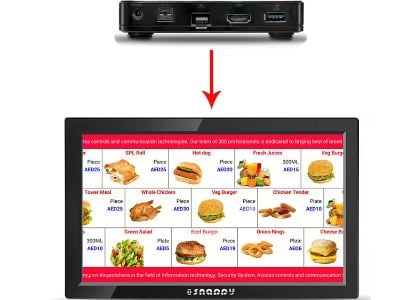
Digital Signage Hardware is an essential part of modern business communication. In this article, we will discuss hardware that supports offline content sync, a feature that is essential for businesses with limited internet access. How does this help companies? This helps teams communicate across areas without relying on a constant web link. By syncing content offline, displaying information across multiple locations becomes easier and more reliable. Offline content sync also supports faster updates during busy periods and helps maintain brand consistency. We will discuss the key concerns of B2B buyers and how this article can help them make purchasing decisions.
What digital signage hardware supports offline content sync?
Digital Signage Hardware that supports offline content sync typically includes built-in storage or memory that allows content to be saved. Having built-in storage makes it possible to store schedules, images and menus for later display. Examples of this include LCD screens, LED displays, and interactive kiosks that have the ability to store data. This storage also helps reduce data transfer costs and keeps content ready for digital signage display kiosk use when the network is slow. These features are important for businesses operating in locations where internet connectivity is not always reliable.
These hardware devices often use platforms like Android or Windows that allow users to upload content to their devices at one time and then sync it back in offline mode. The process keeps a stable flow of updates and makes content less fragile in power outages. This way, even when there is no internet connection, advertisements, information, and other content can continue to be displayed to the target audience. Therefore, the display stays visible and relevant.
Key specifications for digital signage hardware with offline sync
When choosing Digital Signage Hardware that supports offline content sync, it is important to digital signage touch screen kiosk consider the following specifications: This helps buyers compare features for offline content sync across models. You should think about how storage, display quality, connectivity and durability fit your location.
Quality control measures for offline sync digital signage hardware
Storage Capacity: The size of the built-in storage is critical. It should be sufficient to contain the required content to be displayed within the estimated time. This helps offline displays stay current without frequent updates. Display Resolution: The quality of the display is important. High resolution contributes to a clearer and more attractive presentation of content. Higher resolution makes text and images easier to read from a distance. Connectivity Options: Even if syncing is offline, there should still be options for wired and wireless connectivity for uploading content. There should be both wired and wireless options to upload content when the network is available. Operating System: Hardware running on popular operating systems, such as kiosk signage Android or Windows, provides wider compatibility with various software applications for content management. A common OS helps teams work faster and makes content management easier. Durability: These hardware should be durable and able to withstand industrial conditions, especially if they are to be placed in public areas. Durable hardware can save maintenance time and keep signage running in busy public places.
The quality of Digital Signage Hardware with offline sync should be thoroughly checked. A strong quality control plan helps keep the offline content sync stable and reduces risk of outages. Here are some quality control steps that should be taken:
Performance Testing: Before mass production, prototypes should be tested in real-world conditions. Tests should cover typical use cases such as store displays, lobby boards, and queue management. Testing the syncing of content in offline mode is an important part of testing. This helps ensure the device performs well in daily use. Material Testing: It should be ensured that the materials used are of high quality and fit for long-term use. Durability under heat, dust and touch is also checked. These should pass international standards such as CE and RoHS. Compatibility Testing: It is also important to check whether the hardware is compatible with the various software and content formats that will be used by the clients. Compatibility checks should include common file types, apps and mobile integration. Regular Inspections: The units should be subjected to regular inspections during production to ensure consistency and quality of output. Keeping records helps trace issues quickly and improve future builds.
Installation tips for digital signage with offline content sync
Proper installation of Digital Signage Hardware is critical to ensure smooth operation. Following these installation tips helps reduce future maintenance and problems with offline content sync. Here are some tips.
Location Check: Before installation, check the location where the hardware will be placed. Choosing a spot with good lighting and foot traffic helps offline content sync reach the audience. Make sure it is easily visible and accessible. Easy access also helps maintenance and updates without interrupting customers. Wiring and Power Supply: Ensure that the cables are properly installed and have sufficient power supply. Units with high power consumption require a proper electrical setup. A clean cable route reduces wear and keeps devices safe. Testing Connectivity: Before completing the installation, test the device’s connectivity to ensure that it syncs properly when there is internet access. If the signal is weak, consider additional access points or a wired option. User Training: Provide proper training to users so that they better understand the operation of the device, especially uploading and managing content. This training should cover common offline content sync tasks and how to upload content.
Common problems with offline sync digital signage and their solutions
There are many challenges that can be encountered when using Digital Signage with offline sync. Here are some of the common problems and their solutions.
Content Not Updating: If the content is not updating, there may be a storage capacity issue. Make sure there is enough space and check the file formats being used. A check of storage capacity and cache can help identify this problem. Display Issues: If there are display quality issues, it may be caused by incorrect resolution settings. Adjust the resolution according to the display specifications. Type and quality of image files also matter. Connectivity Problems: If the hardware is not syncing properly when there is internet, check the cables and power supply. Sometimes, software updates also need to be performed. Intermittent Performance: If the hardware performance is inconsistent, check external factors such as temperature and humidity that may be affecting the device. Ensure the device runs in a stable environment to reduce this problem.
Through these steps, businesses can make more successful implementations of Digital Signage Hardware with offline content sync, resulting in better and more reliable communication with their target audiences.
Table of Contents
- What digital signage hardware supports offline content sync?
- Key specifications for digital signage hardware with offline sync
- Quality control measures for offline sync digital signage hardware
- Installation tips for digital signage with offline content sync
- Common problems with offline sync digital signage and their solutions