
 EN
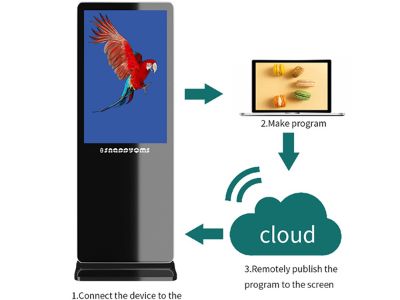
Cloud-based digital signage is an innovative and effective solution for displaying information and advertising across a variety of industries. This shift allows teams to share updates quickly across stores, offices and campuses. In this article, we will discuss why cloud-based digital signage is more advantageous and higher quality than on-premises servers. As businesses move towards more digital and automated processes, it is important for B2B buyers to understand the benefits and issues that can be encountered when using a cloud-based solution. This article aims to provide you with a deeper understanding of the aspects of cloud-based digital signage, from the key technical specifications to the common problems that can arise with on-premises servers.
How cloud-based digital signage enhances supplier reliability?
Cloud-based digital signage offers a higher level of reliability for suppliers. By hosting their systems in the cloud, suppliers have the ability to manage their content from anywhere and at any time. With cloud hosting, content can be updated in seconds, benefiting any local fashion brand, wholesaler, Supermarket, Engineering Services Company, upholstery supplier or product developer place. This eliminates the need for local hardware and software that often cause delays and connectivity issues.
At Shenzhen Jiatean Technology Co., Ltd., we use advanced cloud technology to ensure that our products are reliable and easily accessible. This approach helps teams in various sectors keep pace with changing marketing needs. Our products come with certifications such as ISO9001, CE, and RoHS, giving clients additional confidence that our digital signage display kiosk is not only high quality, but also safe and effective
Key specifications to consider for cloud-based digital signage
When choosing cloud-based digital signage, there are a number of important technical specifications to consider: Knowing these details helps you compare options and avoid wasted spend.
Resolution: The image quality of signage depends on the resolution. Higher resolution results in clearer and more detailed images. Connectivity: It is important to ensure that the signage has a reliable internet connection, as access to the cloud depends on it. Scalability: The ability to expand the system is important, especially as the business grows. Make sure the digital signage touch screen kiosk solution can adapt to the growth of your business. User Interface: An easy to use interface is required to upload and manage content faster. Security Features. Data protection is very important. Advanced security measures should be in place to keep company information safe
These aspects are important to get the best performance from your cloud-based digital signage
Installation guidance for cloud-based digital signage systems
Installing cloud-based digital signage is easier than installing on-premises servers. This easier setup helps small teams and field workers deploy updates quickly. Here are some steps to follow:
Location Analysis: Choose the right location for your signage. For example, a cafe in a busy street with good sight lines can communicate updates to many customers. It should be visible to the target audience and have access to electricity and the internet. Device Setup: Set up the hardware and install the required software. Prepare a simple checklist to avoid missing steps, which helps reduce installation time. Be sure to follow the manufacturer’s instructions for proper installation. Internet Connection: Connect the device to a reliable internet connection. Ensure that the touch screen kiosk digital signage network has enough bandwidth to support streaming content. Consider a backup link or cellular option to prevent outages. Cloud Account Configuration: Sign up for a cloud service and configure your account according to your business needs. Assign roles and permissions to control content access. Testing: Before launching, test the entire system to ensure that all components are working properly and that content is being displayed correctly. Run a small live test in a real setting to confirm visibility and timing.
With proper installation, businesses can get a fast and effective communication solution.
Common problems with local servers and cloud-based solutions
Several issues can arise when using a local server versus a cloud-based solution. Understanding these issues helps buyers plan for risk.
Downtime: Local servers often experience downtime due to hardware failures or power outages. Cloud-based signage also benefits from automatic failover and data replication, reducing the impact of a single failure. In contrast, cloud-based systems are designed to be resilient and have backup solutions. Maintenance: Local servers require regular maintenance and updates, which can be expensive and time-consuming. With cloud-based solutions, updates are managed by the service provider, keeping your system current. Scalability Issues: Scaling up or down a local server can be difficult and costly. Whereas cloud-based solutions are easier to scale depending on the needs. Access Limitations. Local servers may not be accessible from remote locations, while cloud-based systems can be accessed from anywhere, anytime.
These issues demonstrate why cloud-based digital signage is better for modern businesses.
Applications of cloud-based digital signage in various industries
Cloud-based digital signage has a wide range of applications across various industries. In practice, in many settings such as retail stores, healthcare clinics, classrooms and corporate offices, it helps deliver timely messages. Here are some examples
Retail: In stores, digital signage is used to display promotions and new products. This real-time update capability enables quick response to daily sales and changing offers. The ability to update content in real-time allows for more effective marketing.
Healthcare: In hospitals and clinics, digital signage helps display information to patients and visitors, as well as notifications and emergency alerts. This is also useful for reminding patients about appointments and safety guidelines in a timely manner. Corporate Communication: Companies use digital signage in their offices to display internal news, events, and other important information for employees. This supports better team awareness and faster dissemination of policy updates. Transport: In airports and bus stations, digital signage is used for flight information and other notifications. This helps travelers stay informed about delays, gate changes and boarding times.
The versatility of cloud-based digital signage allows for better communication and engagement with customers across a variety of fields.
By understanding the benefits and issues of cloud-based digital signage, B2B buyers can make smarter decisions that will help their business.
Table of Contents
- How cloud-based digital signage enhances supplier reliability?
- Key specifications to consider for cloud-based digital signage
- Installation guidance for cloud-based digital signage systems
- Common problems with local servers and cloud-based solutions
- Applications of cloud-based digital signage in various industries